Does a VPN Protect You from Hackers?
Online security has become a major concern as people increasingly use the internet for online banking, shopping, remote work, social media, and other everyday activities. Cybercriminals continuously develop new methods to steal personal information, monitor online activities, and gain unauthorised access to digital accounts. As a result, many internet users turn to Virtual Private Networks (VPNs) to improve their online privacy and security.
Short answer: partly. A VPN shields one specific part of your online life, your traffic in transit, and it does nothing about many of the ways people actually get hacked. Treating it as a complete security tool is the most common mistake people make with it.
What Is a VPN and How Does It Work?
A Virtual Private Network (VPN) is a security technology that creates an encrypted connection between your device and a VPN server. Instead of sending your internet traffic directly through your internet service provider’s network to its destination, your traffic passes through the VPN tunnel.
Encryption makes intercepted traffic significantly more difficult for unauthorized people to read. A VPN also generally replaces your public IP address with the IP address of its server when you access internet services through the VPN.
For example, imagine connecting to public Wi-Fi at a coffee shop. Without a VPN, certain information about your network traffic may be exposed to someone monitoring the network, depending on the websites, apps, and security protocols you use. With a properly configured VPN, your traffic between your device and the VPN server is encrypted, providing an additional layer of protection.
However, encryption does not mean that every activity you perform online becomes anonymous or completely secure. Websites can still identify you through account logins, cookies, browser fingerprinting, and other tracking methods.
What a VPN Actually Does
A virtual private network creates an encrypted tunnel between your device and a VPN server. Everything you send passes through that tunnel before reaching the wider internet. This has two main effects:
- Your traffic is encrypted between you and the VPN server, so anyone watching the local network (on cafe Wi-Fi, for example) sees scrambled data rather than your activity.
- Your IP address is masked. Websites see the VPN server’s address instead of your own, which hides your approximate location and makes it harder to tie activity back to your home network.
Where a VPN Genuinely Helps
Public Wi-Fi. Airports, hotels, and cafes are where a VPN earns its keep. On an open or poorly configured network, an attacker on the same network may be able to snoop on unencrypted traffic or run “evil twin” hotspots that imitate legitimate ones. A VPN encrypts your traffic before it reaches that network, making this kind of interception far less useful to an attacker.
Hiding activity from your ISP and local network. Your internet provider, or an employer or landlord running the network, can normally see which sites you connect to. A VPN limits that visibility, though the VPN provider can then see it instead.
Protecting your IP address. Exposed IP addresses can be used to estimate your location, and in some contexts, such as online gaming or streaming, to launch denial-of-service attacks. A VPN keeps that address out of view.
Where a VPN Does Not Help
This is the part marketing tends to skip. Most successful attacks on ordinary users bypass the network layer entirely.
Phishing. If you click a fake login page and type in your password, the VPN will faithfully encrypt that password on its way to the attacker.
Malware. A VPN does not scan files or block malicious downloads. If you install a trojan or ransomware, the tunnel offers no protection.
Weak or reused passwords. Credential stuffing, where attackers try leaked passwords across many sites, has nothing to do with your connection.
Data breaches. If a company storing your data is compromised, your VPN is irrelevant.
Social engineering. Scammers who call, text, or message you succeed by manipulating you, not by intercepting packets.
Outdated software. Unpatched operating systems and apps can be exploited regardless of how you connect.
Tracking by accounts and cookies. If you are logged into a service, it knows who you are whatever your IP address says. Browser fingerprinting and cookies also persist through a VPN.
Why HTTPS Changed the Picture
Most of the web now uses HTTPS, which already encrypts the contents of your connection to a website. This is why the “public Wi-Fi is deadly” warning is less dramatic than it used to be. An eavesdropper on cafe Wi-Fi can usually see which domain you visit but not the pages or data inside an HTTPS session. A VPN still adds protection, especially for non-HTTPS traffic and for hiding your destinations, but the gap it fills is narrower than it was a decade ago.
The Trust Problem
A VPN does not eliminate trust, it relocates it. Your ISP can no longer see your browsing, but your VPN provider can. That makes the provider’s honesty and security central to the whole arrangement.
- Free VPNs often fund themselves by collecting and selling data, injecting ads, or offering weak security. Several have been caught doing exactly that.
- “No-logs” claims are only as good as the evidence behind them. Independent audits, transparent ownership, and a track record (including court cases where logs were demanded and none existed) are more meaningful than marketing copy.
- A compromised or malicious provider can see everything that is not otherwise encrypted, which is why the HTTPS point above matters.
How to Choose a VPN Worth Using
If you decide you want one, look for:
- Independent security audits of the service and its apps
- A clear, specific privacy policy and known corporate ownership
- Modern protocols such as WireGuard or OpenVPN
- A kill switch that blocks traffic if the tunnel drops
- A paid model, since you should know how the company makes money
What Actually Protects You
A VPN works best as one layer among several. The measures that prevent most real-world compromises are:
- A password manager with unique, strong passwords for every account
- Multi-factor authentication, ideally with an authenticator app or hardware key rather than SMS
- Prompt software updates for your operating system, browser, and apps
- Skepticism toward links, attachments, and urgent messages
- Reputable antivirus or built-in OS protection
- Regular backups, so ransomware or device loss is survivable
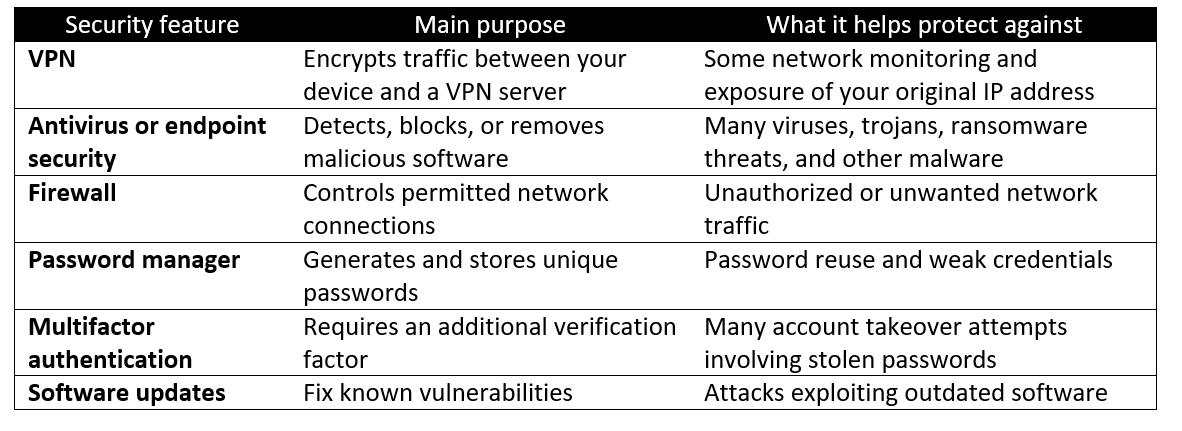
VPN vs. Antivirus vs. Firewall: What Is the Difference?
VPNs, antivirus software, and firewalls serve different purposes. Understanding these differences helps you choose the right combination of security tools.
The Bottom Line
A VPN protects the connection between your device and the internet, which matters most on untrusted networks and when you want to keep your browsing private from your ISP. It does not stop phishing, malware, weak passwords, or data breaches, which are how most people actually get hacked. Used alongside good password hygiene, multi-factor authentication, and up-to-date software, it is a useful tool. Used instead of them, it gives a false sense of security.
Frequently Asked Questions (FAQs)
Does a VPN stop hackers completely?
No. A VPN can reduce some risks associated with network monitoring and IP-address exposure, but it cannot stop all hacking attacks. Phishing, malware, stolen passwords, vulnerable devices, and social engineering remain important threats.
Can hackers see my data if I use a VPN?
A properly configured VPN encrypts traffic between your device and the VPN server. This makes it harder for someone monitoring your local network to read that traffic. However, a VPN does not protect information you voluntarily submit to a fraudulent website, and the security of traffic beyond the VPN server depends on the destination service and the connection used.
Can a VPN protect me from hackers on public Wi-Fi?
Yes, it can provide additional protection by encrypting traffic between your device and the VPN server. However, you should still avoid suspicious Wi-Fi networks, keep your device updated, and use HTTPS websites.
Does a VPN protect me from viruses?
No. A VPN is not a substitute for antivirus or endpoint security software. You can still download or run malware while connected to a VPN.
Can a VPN protect my online banking?
A VPN can add privacy protection when connecting over an untrusted network, but it cannot guarantee the safety of your banking session. Use your bank’s official website or application, enable multifactor authentication where available, and never follow unexpected banking links in emails or messages.
Can hackers track me if I use a VPN?
A VPN can hide your original public IP address from many websites and online services, but it cannot eliminate all tracking. Logged-in accounts, cookies, browser fingerprinting, malware, and information you share online can still reveal your identity or activity.
Is a paid VPN safer than a free VPN?
Not necessarily. Some free VPNs are reputable, while some paid services have poor privacy practices. Evaluate the provider’s security implementation, transparency, logging policy, and independent assessments rather than judging safety by price alone.
Is a VPN enough for complete online privacy?
No. A VPN is one privacy tool, not a complete anonymity solution. Browser settings, tracking protections, secure authentication, careful sharing of personal information, and good device security also matter.
Final Verdict: Is a VPN Worth It for Cybersecurity?
Yes, a VPN can be a valuable cybersecurity tool, but it is not a complete defense against hackers. It encrypts the connection between your device and the VPN server, helps conceal your original IP address from many online destinations, and can reduce certain risks when using public Wi-Fi.
However, it cannot reliably prevent phishing, eliminate malware, fix vulnerable software, or protect accounts compromised by stolen credentials.
For stronger online security, combine a reputable VPN with updated devices, unique passwords, multifactor authentication, endpoint protection, secure Wi-Fi settings, and regular backups. The goal is not to depend on a single tool but to create multiple layers of protection.
Ultimately, a VPN can make some attacks harder, but your overall security depends on how well you protect your devices, accounts, and personal information.