Introduction
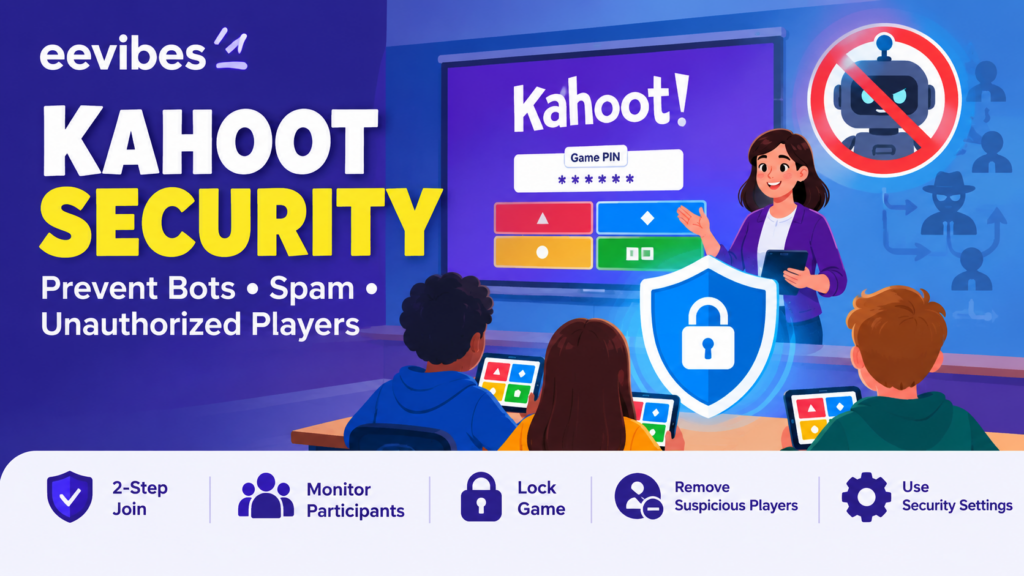
Kahoot has become one of the most widely used interactive learning platforms for classrooms, training sessions, presentations, and online education. Its live-game format makes quizzes engaging because participants can join quickly, answer questions from their own devices, and receive immediate feedback. However, the same simplicity that makes Kahoot convenient can create security challenges when a game PIN, QR code, or joining link reaches people outside the intended audience.
One of the most common problems is the appearance of bots, spam participants, or unauthorised players in a live game. A teacher may expect 25 students but suddenly see dozens of unfamiliar nicknames appearing in the lobby. In other situations, participants may repeatedly join and leave, inappropriate names may appear, or a session may become difficult to manage.
Kahoot itself acknowledges bot-related disruption as a potential problem and provides several controls designed to reduce unwanted participation. Its current documentation recommends using 2-Step Join, nickname controls, removing suspicious participants, locking game joining, keeping sensitive Kahoots private, and educating participants not to share joining information outside the intended audience.
This guide explains how those protections work and how teachers can build a practical security strategy around them.
What Is Kahoot Security?
Kahoot security refers to the combination of technical controls, privacy settings, participant-management tools, and good classroom practices used to protect a Kahoot session from unwanted access or disruption.
There are several different security problems that teachers may encounter.
A participant might accidentally join the wrong game. A student might share a game PIN with friends outside the class. Someone might intentionally introduce inappropriate nicknames. Automated software may attempt to create multiple participants. A publicly shared Kahoot may also become discoverable to people who were not part of the original class.
These situations are not identical, so there is no single “anti-bot button” that solves every problem.
Instead, effective Kahoot security is based on layers:
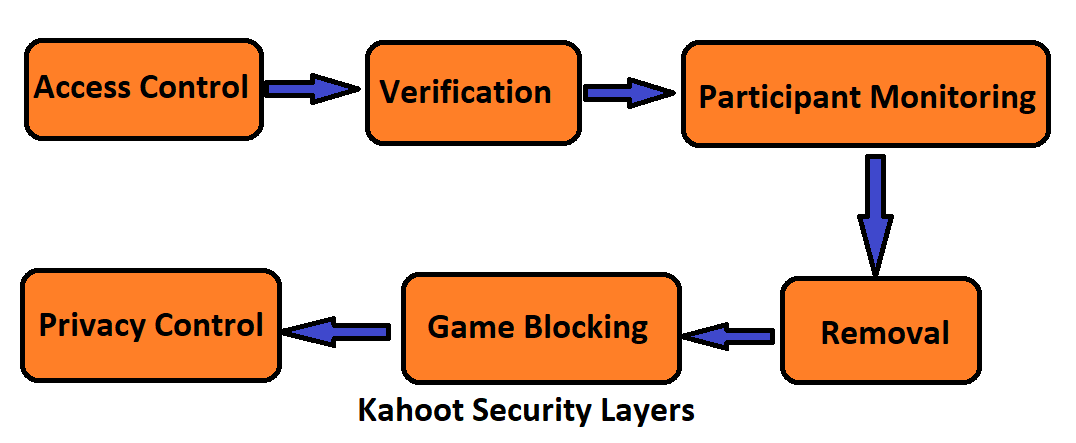
The advantage of this approach is that each layer addresses a different part of the problem.
Why Are Kahoot Games Vulnerable to Unwanted Players?
A live Kahoot session is intentionally designed to be easy to join.
Participants can join through Kahoot’s website or app using a temporary game PIN, and Kahoot also supports direct joining through links and QR codes. The live PIN is generated when the host starts the session and expires when that session ends.
A teacher can display the PIN on a projector and have an entire class join within minutes.
But if the joining information becomes publicly accessible, the same convenience can become a security weakness.
For example, consider a teacher conducting a live Kahoot through an online class. The teacher displays the PIN in a video meeting containing 30 students. If the meeting is recorded, publicly streamed, or accessed by people outside the intended group, the joining information could potentially reach unauthorised participants.
Kahoot therefore advises hosts not to share game PINs publicly on social media, because doing so can result in unwanted participants or bots joining the session.
The Larger Bot Problem on the Internet
Kahoot bot activity is part of a much larger internet-security trend.
Imperva’s 2025 Bad Bot Report found that automated traffic represented 51% of internet traffic in 2024, while bad bots accounted for 37% of all internet traffic. The report classified 55% of bot attacks as advanced or moderate and 45% as simple.
These statistics are not Kahoot-specific. They describe internet traffic measured in Imperva’s research. They also should not be interpreted as meaning that most visitors to educational websites are malicious.
What they demonstrate is the scale of automated activity across the modern internet.
Imperva’s research also reports that automated traffic surpassed human traffic in its 2024 measurement, illustrating why organisations increasingly treat bot management as an application-security issue rather than merely a nuisance.
For educational platforms, the same general principle applies: systems that accept automated interactions need mechanisms for distinguishing legitimate users from unwanted automation.
How Kahoot 2-Step Join Protects a Live Game
The most important built-in protection against unwanted participants is currently 2-Step Join.
Kahoot’s documentation updated September 19, 2026, explains that 2-Step Join adds a verification step after the participant enters the game PIN. Participants must reproduce a four-tile pattern displayed on the host’s screen. Kahoot says the pattern refreshes approximately every 10 seconds.
The basic process is:
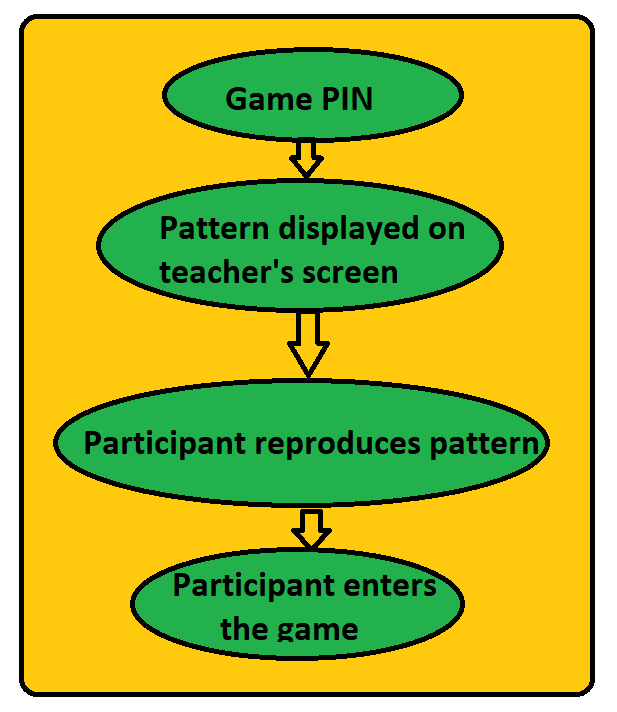
The important security concept is that knowing the PIN alone is no longer sufficient.
A person who has obtained the PIN but cannot see the host’s screen has an additional obstacle to overcome.
Kahoot specifically recommends 2-Step Join when a teacher suspects that a PIN is being shared, has experienced bot attacks or fake participants, or wants to limit access to people who can actually see the host screen.
How to Enable 2-Step Join
According to Kahoot’s current instructions, teachers hosting a live game can enable the feature from the live-game settings.
The process is:
- Open the Kahoot you want to host.
- Select Host Live.
- Choose the desired game experience.
- Open the settings menu.
- Find 2-Step Join under the advanced settings.
- Turn it on.
- Ask participants to enter the game PIN and reproduce the pattern shown on the host screen.
The feature is designed for live games in the lobby rather than Kahoot assignments or self-paced games.
An important detail is that QR codes and direct joining links do not bypass the protection. When 2-Step Join is enabled, participants using those methods still have to complete the additional pattern step.
Does 2-Step Join Completely Stop Bots?
No.
This is an important distinction for anyone writing about Kahoot security.
Kahoot states that 2-Step Join is very effective against most known bot services but also explicitly says that no single setting can guarantee a completely bot-free game.
This is a fundamental cybersecurity principle.
Attackers and automated systems change over time. A defence that works against one automated technique may not necessarily stop a new technique.
Therefore, teachers should think of 2-Step Join as one security layer rather than a complete security solution.
The strongest approach combines:
2-step join + private access + participant monitoring + removal + game locking
Lock the Kahoot Game Once Students Have Joined
Another simple but powerful protection is the Lock Game option.
Suppose a teacher expects 30 students. Thirty legitimate students enter the lobby, and the teacher verifies the participant list.
At this point, allowing additional participants to continue joining provides little benefit.
Kahoot’s live-game controls allow the host to lock in joining so that no more participants can enter.
Remove Unauthorized Players Before Starting
Teachers can also remove participants directly from the lobby.
Kahoot’s live-game documentation states that a host can click a participant’s nickname in the lobby to remove that player before gameplay begins.
This makes the lobby more than just a waiting room.
It becomes a basic security checkpoint.
For example, if a teacher expects 25 students and sees:
25 expected students + 12 unfamiliar participants
The teacher can investigate before beginning the activity.
A teacher does not necessarily need to determine whether those participants are bots. If they are not supposed to be there, removing them and securing the session may be sufficient.
How to Recognize Potentially Unauthorized Players
There is no single characteristic that proves a participant is a bot.
A strange nickname does not necessarily mean that the participant is automated. A student might choose a funny name. A student may reconnect after losing internet access. Multiple participants may even join simultaneously because the teacher has just displayed the PIN.
Therefore, teachers should look for patterns.
Potential warning signs include:
- A participant count far above the expected class size.
- Many unfamiliar participants appearing almost simultaneously.
- Repeated joining and leaving.
- Numerous unusual or inappropriate nicknames.
- Participants appearing even though the PIN was not intentionally shared with them.
- Unexpected activity immediately after a PIN or QR code was publicly exposed.
These indicators should be treated as signals for investigation rather than definitive proof of malicious automation.
Use the Kahoot Nickname Generator.
Nickname management is another useful security layer.
Kahoot provides a nickname generator that allows participants to generate random names instead of manually entering one. Kahoot’s documentation says participants can spin for a generated nickname up to three times.
This can make classroom management easier because participants are less likely to enter inappropriate or disruptive names.
Kahoot also has mechanisms for filtering inappropriate nicknames. If an inappropriate name is detected, the system can automatically replace it with a neutral alternative, according to Kahoot’s current support documentation.
For younger students, large classes, or public-facing educational events, this can reduce the amount of manual moderation required from the teacher.
Protect the Kahoot PIN
The game PIN is one of the most important pieces of information in a live Kahoot session.
Kahoot states that a live PIN is generated when the host starts the session and expires when that session ends. Starting another live session generates a new PIN.
This temporary nature is useful from a security perspective.
However, teachers should still control where the PIN is displayed.
Avoid posting active joining information in places such as:
- Public social media posts
- Public forums
- Public livestreams
- Open websites
- Unrestricted group chats
Instead, distribute the PIN through the communication channel intended for the class.
Kahoot itself specifically warns against publicly sharing game PINs because this can lead to unwanted participants or bots joining.
Keep Important Kahoots Private
Not every Kahoot needs to be publicly discoverable.
For ordinary classroom activities, public visibility may be perfectly appropriate. But assessments and sensitive instructional materials may benefit from more restrictive visibility settings.
Kahoot’s current 2-Step Join guidance recommends keeping sensitive Kahoots private and notes that private visibility can reduce discoverability by services that scan public games for answers.
This is especially relevant for:
- Exams
- Quizzes containing unreleased questions
- Certification assessments
- Teacher-created tests
- Competitive classroom activities
Security is not just about controlling who joins a live session. It can also involve controlling who can discover the underlying content.
Kahoot Security and Student Privacy
Security and privacy should be considered together.
Kahoot’s current Trust Center states that the platform uses a privacy-focused approach and says participants can join without accounts using PIN-based access. It also states that Kahoot does not sell personal data or student data for marketing purposes.
Kahoot’s current Privacy Notice, effective September 1, 2026, explains that the company processes different categories of information depending on how its services are used and describes technical and organisational measures, including encryption, firewalls, access limitations, and security controls.
For schools, however, platform-level security is only one part of privacy compliance.
Kahoot Security and Student Privacy
Security and privacy should be considered together.
Kahoot’s current Trust Center states that the platform uses a privacy-focused approach and says participants can join without accounts using PIN-based access. It also states that Kahoot does not sell personal data or student data for marketing purposes.
Kahoot’s current Privacy Notice, effective September 1, 2026, explains that the company processes different categories of information depending on how its services are used and describes technical and organisational measures, including encryption, firewalls, access limitations, and security controls.
For schools, however, platform-level security is only one part of privacy compliance.
Teachers should also follow their institution’s rules regarding:
- Student names
- Student identifiers
- Assessment records
- Account information
- Data retention
- Sharing of screenshots
- Recording online classes
A useful security principle is:
Collect and expose only the information needed for the educational activity.
Kahoot Security and AI Automation
Artificial intelligence is also changing the broader automation landscape.
Modern automation systems can increasingly imitate normal browser activity and human interaction. Cybersecurity research has consequently shifted toward behavioural analysis rather than relying exclusively on simple signatures.
Imperva’s 2025 research found that 55% of bot attacks in 2024 were categorised as advanced or moderate, compared with 45% classified as simple. This does not mean that Kahoot bots necessarily use AI. Instead, it illustrates a broader cybersecurity trend: automated systems are becoming increasingly sophisticated.
For educators, this reinforces the importance of using platform-level security controls rather than attempting to identify every automated participant manually.
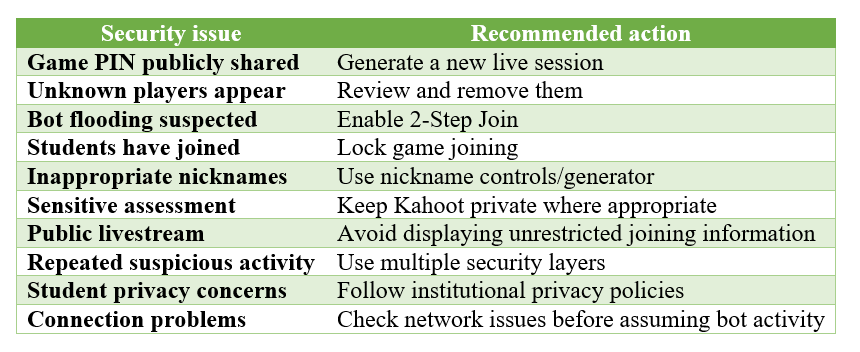
A Practical Kahoot Security Strategy
Teachers can create a simple security routine without becoming cybersecurity specialists.
Before the Kahoot
- Keep the game PIN private.
- Avoid publishing active joining links or QR codes publicly.
- For sensitive quizzes, consider private visibility.
- Enable 2-Step Join when appropriate.
- Consider enabling the nickname generator.
During the lobby
- Check the participant count.
- Look for unfamiliar participants.
- Remove clearly unauthorised players.
- Verify that the expected class is present.
Before starting
- Lock game joining once the intended participants have joined.
- Check that the correct Kahoot is being used.
- Confirm that sensitive assessment material is not unnecessarily exposed.
If suspicious activity occurs
- Pause.
- Assess whether the problem could be a normal connectivity issue.
- Remove unauthorised participants.
- Lock joining.
- If the PIN has been compromised, start a new session with a new PIN.
- Enable 2-Step Join.
What Teachers Should Not Do
Teachers generally do not need to fight bots by attempting to attack the bot service itself.
Trying to identify or retaliate against an unknown automated system can introduce additional security and privacy problems.
Instead, the safer strategy is to control the classroom environment:
Control access → verify participants → remove unauthorised players → lock the session.
This shifts the focus from attacking the attacker to protecting the learning activity.
Is Kahoot Completely Secure?
No online service should be described as completely immune to abuse. Kahoot itself states that it continually monitors traffic, identifies bot patterns, and adjusts its defences, while also acknowledging that it cannot guarantee a completely bot-free experience because new services can appear.
This is a realistic cybersecurity position. Security is an ongoing process rather than a permanent state.
Kahoot also maintains a formal security programme. Its Trust Center describes controls including organisational security procedures, risk assessments, password controls, penetration testing, and other technical and administrative safeguards.
Final Thoughts
Kahoot security is ultimately about maintaining control over who can participate, what information is exposed, and how the teacher responds when something unusual happens.
Bots and spam participants can turn a simple classroom quiz into a distracting experience, but teachers can significantly reduce the risk by combining several straightforward controls.
The most important measures are:
- Keep the PIN private.
- Enable 2-Step Join for live games when unwanted participation is a concern.
- Monitor the lobby.
- Remove suspicious participants.
- Use nickname controls.
-
Lock joining once the intended students are present.
-
Keep sensitive Kahoots private where appropriate.
Create a new session if the existing PIN has been compromised.
Kahoot’s own current guidance recommends exactly this type of layered approach and emphasises that 2-Step Join should not be treated as a guarantee against every possible bot.
The broader lesson extends beyond Kahoot. As automation becomes increasingly common across the internet, online classroom security is becoming part of digital teaching itself. Teachers do not need to become cybersecurity experts, but understanding basic access control, privacy, verification, and participant management can make digital learning environments considerably more resilient.
Also read here: